

Payment agreement
Overview
A payment agreement lets you charge a customer without them having to approve each charge. The customer accepts the agreement once, and after that your backend can initiate charges on their behalf — no app switch and no per-charge confirmation. You decide both the amount and the timing of every charge.
Typical uses:
- Let a customer buy a product now, and charge them again later for new purchases without sending them back to the payment app.
- Charge a customer based on their actual usage over a period (for example daily, weekly, or monthly).
Charges are not automatic. An agreement never charges anything on its own — it only gives you the ability to charge later, and your backend must initiate each charge.
Payment agreements are part of the Payments API and are managed through the endpoints under the Payment Agreements tag.
Before you begin
- Payment agreements are a new capability and still evolving — expect the API and this guide to change. They are ready for proof-of-concept work.
- Agreements are currently only supported with the Vipps payment provider.
- The functionality is disabled in Vipps by default and must be activated for each partner/merchant. Contact Entur (Team Betaling) to get it enabled.
- Only the flexible pricing model is supported today (see Pricing models).
Pricing models
An agreement carries a pricing model that describes what the customer is agreeing to. Today only one model is generally available:
- FLEXIBLE – no fixed amount and no fixed schedule. Your backend decides the amount and timing of each charge. This fits pay-as-you-go and charge-on-demand products.
Two other models — FIXED (same amount at a regular interval) and VARIABLE (a regular interval with an amount that varies up to a customer-set maximum) — exist in the API but are not generally available yet. Contact Team Betaling if you think you need them.
What the customer is agreeing to
With a flexible agreement the customer authorizes open-ended, merchant-initiated charges: there is no preset amount, cap, or schedule shown to them. Once the agreement is active, your backend can charge any amount at any time until the agreement ends.
Because of this, it is your responsibility to tell the customer clearly what they are agreeing to before they confirm. You own the frontend and the direct customer relationship — Entur and Vipps only surface the product name at confirmation, not the terms of what you will charge. Make the scope of the authorization explicit in your own UI.
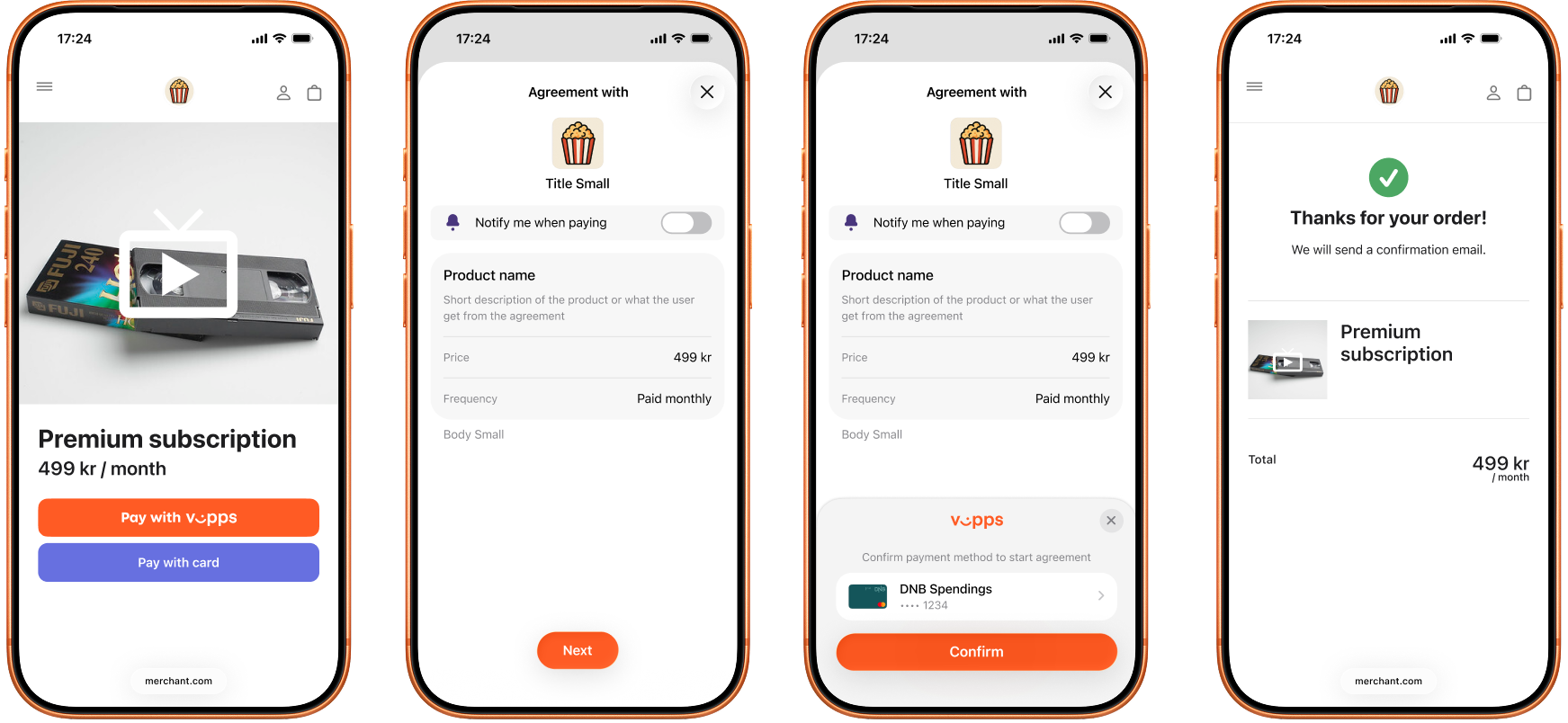
Illustrative example of the Vipps confirmation screen. The exact screen depends on the payment provider and version. Source: Vipps MobilePay Recurring API.
Creating an agreement
There are two ways to create a payment agreement. Which one you choose depends on whether you want to charge the customer at the same time as the agreement is set up.
Both flows require you to provide:
customerNumber– identifies the customer the agreement belongs to. You use the same value later to look up the customer's agreements.merchantAgreementUrl– a page on your site where the customer can view and manage the agreement. Vipps requires this. The customer reaches it from the agreement's details screen in the Vipps app, and Vipps opens it in the device's normal web browser (not inside the app), so it must link directly to the management page. In Entur's setup, stopping an agreement inside the Vipps app is turned off, so this page is the customer's route to managing the agreement — it is where they ask you to stop it.merchantRedirectUrl– where the customer returns after they accept or reject the agreement.phoneNumber(optional) – the customer's phone number, used for the Vipps push notification.
Create the agreement on its own
Register the agreement directly. This drafts the agreement with the provider and gives you a confirmation URL to send the customer to; once they confirm, the agreement becomes active. No money is charged in this flow — you are only setting up the ability to charge later. Use it when you want the agreement in place up front, before any purchase.
Create the agreement together with a payment
You can also set up the agreement as part of an ordinary payment, so the customer approves the first charge and the agreement in a single step. When you create the payment, you flag the transaction to also create an agreement: the transaction amount becomes the initial charge, and a flexible agreement is set up for future merchant-initiated charges. Use this when the customer is buying something now and you also want to be able to charge them again later without an app switch.
Initiating a charge
Once an agreement is active, your backend initiates every charge. The customer has already approved the agreement, so charges are merchant-initiated and happen without an app switch — the customer is not prompted to confirm each one.
A charge always follows the same steps: create a payment, add a transaction that
references the agreement (paymentAgreementId), and app-claim the transaction to
initiate the charge with Vipps. This mirrors the ordinary payment flow, which is
why the agreement charge reuses the same create-payment and app-claim endpoints.
Because the agreement is already in place, the app-claim returns 204 No Content
with no redirect URL, and a flexible charge is captured immediately.
When a charge fails
A charge can fail even on an active agreement — for example if the customer has insufficient funds or their card has expired. Vipps notifies the customer in the app and does not always return the exact reason to you, so treat a failed charge as "not captured" and decide in your own flow whether to retry or hold back the product. There is no automatic retry; if you want one, your backend must trigger it.
Agreement lifecycle
An agreement moves through these statuses:
- CREATED / PENDING – drafted and waiting for the customer to confirm. The confirmation URL is only present while the agreement is in one of these statuses.
- ACTIVE – the customer has confirmed. The agreement can now be charged.
- EXPIRED – the customer never confirmed in time. The agreement can no longer be used; create a new one if needed.
- STOPPED – the agreement has been ended and can no longer be charged.
After you redirect the customer, poll the agreement until it becomes ACTIVE
(confirmed) or EXPIRED (not confirmed in time). Everything else in the
lifecycle is driven by your own backend, so you do not need to poll for it.
Stopping an agreement
An agreement runs until you stop it: because the customer asked you to, from the
page you gave as merchantAgreementUrl, or because the product it pays for has
ended. Stopping ends the agreement at Vipps as well, so it disappears from the
customer's app.
Stopping is not a refund. Charges that were already captured are untouched; credit those transactions separately if the customer should have their money back.
Cancelling a charge versus stopping the agreement
Cancelling the initial charge of an agreement the customer has not yet confirmed also stops the agreement, which only existed to carry that charge. Deactivating the payment that holds the charge does the same.
Cancelling a charge on a confirmed agreement leaves it active: an agreement outlives its individual charges. To end a confirmed agreement, call stop explicitly.
Updating an agreement
In one call you can change an agreement's productName and
merchantAgreementUrl; the change applies at Vipps and at Entur together, and
the customer does not have to re-confirm. A flexible agreement sets its amount
per charge, so there is no price to update.
Look up a customer's agreements
To retrieve the agreements for a given customer across all organisations you
have access to, query them by customerNumber and optionally filter by one or
more statuses.